15 Microsoft Entra ID Interview Questions are often enough to determine whether a candidate truly understands identity design—or is simply repeating documentation. At the intermediate level, interviewers assume you already know the fundamentals of identity and access management. What they test next is your ability to design secure access, anticipate failure scenarios, reduce administrative risk, and balance security with real business needs.
This guide is written as a focused, high-depth reference rather than a long checklist. Each question reflects how Microsoft Entra ID is discussed in real interviews and real enterprise environments—where decisions, trade-offs, and reasoning matter more than feature names or portal steps.
If you can explain the answers in this article clearly and calmly, you are already thinking like an identity engineer, not just an administrator.
Before proceeding, it is assumed that you already have a beginner-level understanding of Microsoft Entra ID. This includes familiarity with foundational topics such as what Microsoft Entra ID is, why identity matters, and basic authentication concepts, which were covered in the earlier beginner-level article with 50 questions.
This guide intentionally does not repeat those fundamentals. Instead, it builds on them—focusing on how identity controls are designed, secured, and managed in real enterprise environments, which is exactly what interviewers evaluate at the intermediate level.
If you prefer a visual walkthrough, the foundational concepts assumed here are covered in the Microsoft Entra ID video series on the Byqus YouTube Channel ↗.
15 Microsoft Entra ID Interview Questions and Answers
Designing Authentication and Access
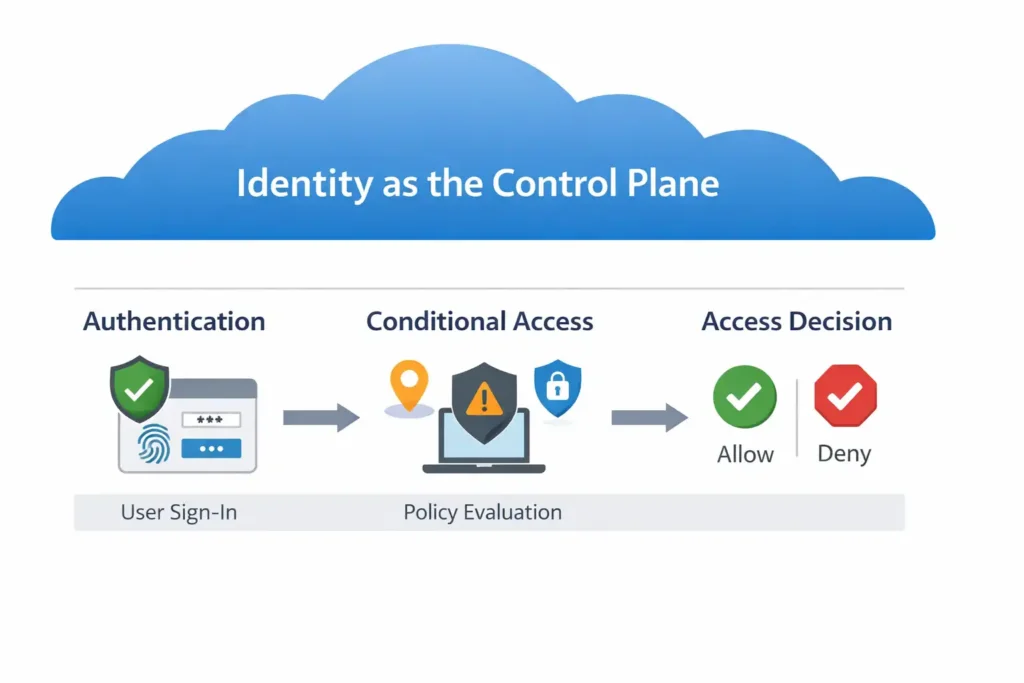
This section evaluates how you design authentication flows and access boundaries—something interviewers care about far more than simply enabling sign-ins.
1. How do you decide the appropriate authentication strength for different users?
What it is
Authentication strength is the level of assurance required to verify an identity before granting access. In Microsoft Entra ID, this is not a single setting—it is a combination of factors such as password-only sign-in, multi-factor authentication (MFA), phishing-resistant methods, and contextual checks applied during sign-in.
Why it exists / why it matters
Not all users and actions carry the same risk. Applying the same authentication strength to everyone either weakens security (if too lenient) or harms productivity (if too strict). Authentication strength exists to align protection with risk, ensuring high-risk identities and actions receive stronger verification without unnecessarily burdening low-risk users.
Where it is used
In real environments, authentication strength varies by:
- User type (standard users vs administrators)
- Access sensitivity (email vs admin portals vs financial systems)
- Context (location, device compliance, sign-in risk)
This is typically enforced through Conditional Access policies rather than per-user manual configuration.
Interview framing
Interviewers are not looking for “enable MFA for everyone” answers. They expect you to explain risk-based decision-making: identify which users or actions are high risk, apply stronger authentication where impact would be highest, and justify the trade-off between security and usability. Strong candidates clearly articulate why different users require different authentication strength, not just how to configure it.
2. How would you design access controls for remote users without relying on VPNs?
What it is
Designing access controls without VPNs means using identity-based and context-aware controls instead of network location to protect resources. In Microsoft Entra ID, access decisions are made during authentication using signals such as user identity, authentication strength, device state, and risk.
Why it exists / why it matters
VPNs extend the corporate network to remote users, but they also extend trust. Once connected, users often gain broad network access, increasing blast radius if credentials are compromised. Identity-based access reduces this risk by granting application-level access, not network-level trust, making security more precise and resilient.
Where it is used
This approach is common in cloud-first and hybrid environments where users access Microsoft 365, Azure resources, and SaaS applications directly over the internet. Controls are enforced through Conditional Access policies rather than network tunnels.
Interview framing
Interviewers expect you to explain why VPNs are no longer the default security answer. Strong candidates describe how access is evaluated per request—using MFA, device compliance, and risk signals—and emphasize that identity-centric access limits exposure even when users work from anywhere.
3. How do you handle access for unmanaged or personal devices?
What it is
Handling access for unmanaged or personal devices means controlling what users can do when they sign in from devices that are not enrolled, compliant, or fully trusted. In Microsoft Entra ID, this is achieved by evaluating device state during authentication and applying access restrictions accordingly.
Why it exists / why it matters
Unmanaged devices fall outside organizational control. They may lack security updates, endpoint protection, or encryption, increasing the risk of data leakage and credential compromise. Blocking all unmanaged devices is often impractical, so the goal is to reduce risk without stopping work.
Where it is used
Common in BYOD scenarios, contractor access, and external collaboration. Typical controls include allowing browser-based access only, restricting downloads, enforcing stronger authentication, or limiting access to less sensitive applications.
Interview framing
Interviewers look for balanced reasoning, not absolute answers. Strong candidates explain why unmanaged devices are treated as higher risk, how access can be limited rather than completely denied, and how these decisions protect data while maintaining usability.
Conditional Access Strategy and Failure Scenarios
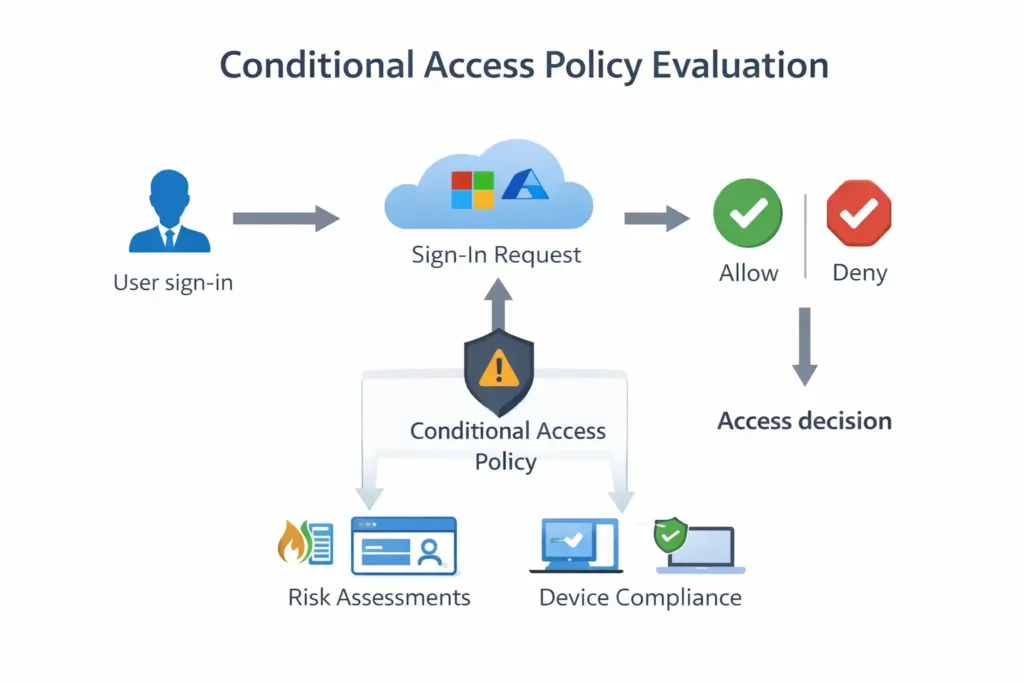
Here, interviewers test whether you understand Conditional Access as a policy system that can fail if misdesigned.
4. How do you design Conditional Access policies without risking tenant lockout?
What it is
Designing Conditional Access safely means creating access policies that enforce security without accidentally blocking all administrators or users. In Microsoft Entra ID, Conditional Access evaluates sign-in conditions and applies controls such as MFA, device requirements, or access blocking.
Why it exists / why it matters
Conditional Access is powerful, but misconfiguration can lead to tenant-wide lockouts—especially when policies apply broadly or affect administrative accounts. A single overly aggressive rule can prevent access to the tenant, turning a security control into an operational outage.
Where it is used
This concern appears during policy creation for MFA enforcement, legacy authentication blocking, device compliance requirements, and admin protection—particularly in production tenants.
Interview framing
Interviewers expect you to demonstrate risk-aware policy design. Strong answers include practices like using report-only mode, scoping policies to test groups first, excluding emergency (break-glass) accounts, and gradually expanding enforcement. The key signal is that you anticipate failure scenarios before they occur.
5. Why should Conditional Access policies be scoped and layered rather than broad?
What it is
Scoping and layering Conditional Access means creating multiple targeted policies, each addressing a specific risk or scenario, instead of a single broad rule that applies to everyone and everything. In Microsoft Entra ID, policies are evaluated cumulatively during sign-in.
Why it exists / why it matters
Broad policies are hard to reason about, difficult to troubleshoot, and risky to change. A small modification can unintentionally impact a large population or critical workflows. Layered policies reduce blast radius by isolating controls—so a change meant for admins doesn’t affect standard users, and a device rule doesn’t unintentionally block emergency access.
Where it is used
In real environments, you commonly see separate policies for:
- Baseline user access (e.g., MFA for standard users)
- Administrative roles (stricter controls)
- High-risk sign-ins or users
- Specific applications or device states
Each policy handles one concern well, rather than many concerns poorly.
Interview framing
Interviewers are testing whether you think in risk segments, not convenience. Strong candidates explain that scoping and layering improve security and operations: policies are easier to test, safer to roll out, and simpler to troubleshoot when access breaks. This shows you understand Conditional Access as a system, not a checkbox.
6. How do you troubleshoot a Conditional Access policy that blocks legitimate users?
What it is
Troubleshooting a Conditional Access issue means identifying which policy or condition caused access to be blocked and why it evaluated the sign-in the way it did. In Microsoft Entra ID, multiple Conditional Access policies can apply simultaneously, and the final decision is the cumulative result of those evaluations.
Why it exists / why it matters
Conditional Access is intentionally strict. When legitimate users are blocked, the issue is usually not a system failure but a design or scoping problem. If troubleshooting is ad hoc or reactive, organizations risk weakening security controls just to restore access, which introduces long-term risk.
Where it is used
This scenario commonly occurs during MFA rollouts, device compliance enforcement, location-based rules, or when new policies are introduced into production environments.
Interview framing
Interviewers expect a structured troubleshooting approach. Strong candidates explain that they review sign-in logs to identify the exact policy and condition that failed, confirm whether the user, device, or location met policy requirements, and validate assumptions made during design. Importantly, they emphasize fixing policy logic or scope rather than disabling security controls outright—demonstrating both operational discipline and security maturity.
Administrative Risk and Privilege Control
This section focuses on how you reduce risk around the most powerful identities.
7. How do you limit administrative exposure in Microsoft Entra ID?
What it is
Limiting administrative exposure means reducing who has admin privileges, how much privilege they have, and how long they have it. In Microsoft Entra ID, this is achieved through careful role assignment, separation of duties, and conditional enforcement around administrative access.
Why it exists / why it matters
Administrative accounts are the highest-value targets for attackers. If an admin account is compromised, the impact is far greater than a standard user breach—often leading to tenant-wide control. Limiting exposure reduces the blast radius and makes successful attacks harder and less damaging.
Where it is used
In real environments, this applies to tenant administration, identity configuration, application management, and security operations—especially in organizations with multiple IT teams or delegated responsibilities.
Interview framing
Interviewers are looking for risk-based thinking, not just role names. Strong candidates explain that admin access should be limited by:
- Assigning the least privileged role required for the task
- Avoiding permanent admin rights where possible
- Applying stricter authentication and access conditions for admins
Most importantly, they show awareness that administrative access is an exception, not the default—demonstrating maturity in identity security design.
8. Why should Global Administrator usage be minimized, and how do you achieve that?
What it is
The Global Administrator role in Microsoft Entra ID provides unrestricted access to almost every identity, security, and configuration setting in the tenant. It is the most powerful role available.
Why it exists / why it matters
Because of its broad permissions, a compromised Global Administrator account effectively means full tenant compromise—users, apps, security controls, and data can all be altered or disabled. From a security standpoint, this role represents the largest possible blast radius, which is why its usage must be tightly controlled.
Where it is used
In practice, Global Administrator access is required only for a small number of critical tasks, such as initial tenant setup, emergency recovery, or rare configuration changes that cannot be delegated to lower-privileged roles.
Interview framing
Interviewers expect you to explain both the risk and the mitigation strategy. Strong candidates describe minimizing Global Administrator usage by:
- Assigning specialized admin roles instead of Global Admin wherever possible
- Keeping the number of Global Admins extremely low
- Ensuring Global Admin accounts use strong authentication and stricter access conditions
- Reserving Global Admin access for emergencies or tightly controlled scenarios
The key signal interviewers look for is this: you treat Global Administrator as a last-resort role, not a convenience role.
9. How do break-glass accounts fit into a secure identity design?
What it is
Break-glass accounts are emergency administrative accounts created specifically to regain access to the tenant when normal authentication paths fail. In Microsoft Entra ID, they are typically highly privileged accounts that are excluded from certain automated access controls.
Why it exists / why it matters
Modern identity security relies heavily on Conditional Access, MFA, and risk-based controls. While these controls are essential, misconfigurations, outages, or dependency failures can accidentally lock out all administrators. Break-glass accounts exist to ensure availability of administrative access even when security mechanisms fail, preventing a security control from becoming a business-stopping incident.
Where it is used
Break-glass accounts are used only in exceptional situations—for example, when Conditional Access policies block all admins, MFA services are unavailable, or an identity outage prevents standard admin sign-in. They are not meant for daily administration.
Interview framing
Interviewers are testing whether you understand security versus availability trade-offs. Strong candidates explain that break-glass accounts:
- Are limited in number
- Are protected with very strong credentials
- Are excluded from Conditional Access by design, not by accident
- Are closely monitored and rarely used
The key signal is balance: you recognize that a secure identity design must protect against attacks and ensure recoverability when security controls fail.
Incident Response and Identity Security
Interviewers use these questions to see how you respond under pressure.
10. How would you respond to a suspected compromised user account?
What it is
Responding to a suspected compromised account means taking controlled, step-by-step actions to contain risk, confirm compromise, and restore security without causing unnecessary disruption. In Microsoft Entra ID, this response is driven by identity signals such as risky sign-ins, unusual behavior, or user reports.
Why it exists / why it matters
Compromised identities are one of the most common entry points for attackers. A delayed or poorly handled response can allow lateral movement, data exfiltration, or privilege escalation. At the same time, overreacting—such as disabling large numbers of accounts blindly—can disrupt business operations. The goal is to contain the threat while preserving control.
Where it is used
This scenario appears in day-to-day security operations when alerts indicate suspicious sign-ins, impossible travel, unfamiliar devices, or abnormal access patterns. It is especially critical for accounts with elevated privileges or access to sensitive data.
Interview framing
Interviewers expect a methodical response, not a panicked one. Strong candidates explain a clear sequence:
- Immediately limit access (for example, force sign-out or require stronger authentication)
- Investigate sign-in logs and activity to confirm whether compromise is likely
- Remediate by resetting credentials, revoking sessions, and validating account recovery
- Review access and policies to ensure no persistent risk remains
The key signal interviewers look for is composure and reasoning: you understand that incident response in identity security is about containment, validation, and recovery, not just disabling accounts and hoping for the best.
11. How do you handle high-risk sign-in or user risk detections?
What it is
High-risk sign-in or user risk detections indicate that Microsoft Entra ID has identified anomalous or suspicious behavior related to an authentication attempt (sign-in risk) or an identity over time (user risk). These detections are based on signals such as unfamiliar locations, atypical sign-in patterns, or leaked credentials.
Why it exists / why it matters
Risk detections exist to identify potential identity compromise early, often before damage occurs. Not every risky sign-in is an actual breach, but ignoring these signals allows attackers time to escalate privileges or move laterally. At the same time, treating every risk as a confirmed breach can unnecessarily disrupt users and operations. The objective is measured, risk-based response.
Where it is used
In real environments, these detections feed into Conditional Access policies and identity security workflows. They are commonly used to trigger actions such as requiring MFA, forcing password changes, or temporarily blocking access until risk is resolved.
Interview framing
Interviewers want to see that you differentiate response based on risk level. Strong candidates explain that:
- Medium risk may warrant step-up authentication (for example, MFA)
- High risk often requires stronger action, such as password reset or access restriction
- Risk should be remediated, not just acknowledged, so the user returns to a safe state
The key signal interviewers look for is balance: you trust automated risk signals, apply proportionate controls, and focus on restoring a secure identity posture rather than reacting with blanket lockouts.
12. What steps do you take to investigate repeated authentication or MFA failures?
What it is
Investigating repeated authentication or MFA failures means identifying why valid users are unable to successfully complete sign-ins and whether the failures indicate misconfiguration, user friction, or a potential security issue. In Microsoft Entra ID, these failures are visible through sign-in logs and authentication details.
Why it exists / why it matters
Repeated failures can signal very different problems: user confusion, broken Conditional Access logic, device compliance issues, or even credential-stuffing attacks. Treating all failures as user error risks hiding security threats, while assuming compromise too quickly can disrupt legitimate access. The goal is to identify the root cause accurately.
Where it is used
This scenario commonly appears during MFA rollouts, policy changes, device transitions, or when users change phones or authentication methods. It also surfaces in security monitoring when abnormal sign-in patterns are detected.
Interview framing
Interviewers expect a systematic investigation approach. Strong candidates explain that they:
- Review sign-in logs to determine which step failed (primary authentication, MFA challenge, device requirement)
- Validate whether Conditional Access conditions were met or incorrectly triggered
- Check whether failures are isolated to a user, group, device type, or location
- Distinguish between usability issues and indicators of malicious activity
The key signal interviewers look for is discipline: you troubleshoot using evidence and context, fix underlying causes, and avoid weakening security controls simply to reduce user complaints.
Scalability, Governance, and Trade-offs
This final section tests whether you think beyond today’s configuration and design for growth.
13. How do you prevent privilege creep as an organization grows?
What it is
Privilege creep is the gradual accumulation of access rights beyond what users actually need as roles change, teams expand, and responsibilities evolve. In Microsoft Entra ID, preventing privilege creep means actively managing who has access, why they have it, and whether it is still justified over time.
Why it exists / why it matters
As organizations grow, access is often added quickly to enable productivity, but rarely removed with the same urgency. Over time, users retain permissions from previous roles, increasing the risk of accidental misuse or exploitation. Privilege creep expands the attack surface and makes it harder to assess the impact of a compromised account.
Where it is used
This issue appears in growing enterprises with frequent role changes, internal mobility, project-based access, and expanding administrative teams. It is especially critical for administrative roles and access to sensitive applications.
Interview framing
Interviewers are looking for governance thinking, not one-time cleanup. Strong candidates explain that preventing privilege creep requires:
- Assigning access based on roles or functions rather than individuals
- Regularly reviewing and validating access, especially for privileged roles
- Ensuring access is removed when roles change, not just when users leave
The key signal is that you treat access as temporary and reviewable, not permanent—demonstrating an understanding that identity security is an ongoing process, not a setup task.
14. How do you balance strong security controls with user experience?
What it is
Balancing security and user experience means applying risk-based identity controls so that protection adapts to context rather than treating every sign-in the same. In Microsoft Entra ID, this is achieved by evaluating signals at sign-in and enforcing controls proportionally.
Why it exists / why it matters
Security that is too strict creates friction—users get blocked, productivity drops, and unsafe workarounds emerge. Security that is too lenient increases the likelihood and impact of compromise. The goal is not to choose between security and usability, but to optimize both by matching control strength to risk.
Where it is used
This balance shows up most clearly in:
- MFA frequency and methods
- Conditional Access scoping (who, what app, under which conditions)
- Device-based trust (compliant vs unmanaged devices)
- Session controls for sensitive applications
These decisions affect daily access for remote users, frequent travelers, and executives.
Interview framing
Interviewers are looking for judgment and trade-off awareness, not extremes. Strong candidates explain that they:
- Enforce stronger controls for high-risk users, roles, apps, or conditions
- Reduce friction in low-risk scenarios using trusted signals (e.g., compliant devices, familiar locations)
- Continuously review impact and adjust policies without weakening overall posture
The key signal is maturity: you understand that effective identity security is sustainable only when users can work productively within it, and that balance is achieved through context-aware design, not blanket enforcement.
15. What design choices ensure your Entra ID configuration scales over time?
What it is
Designing for scale means configuring Microsoft Entra ID so that growth in users, applications, and security requirements does not require constant rework. Scalable identity design focuses on structure, consistency, and governance rather than one-off configurations.
Why it exists / why it matters
As organizations grow, identity environments naturally become more complex—more users, more apps, more admins, more policies. Without scalable design choices, this complexity turns into fragility: policies overlap, permissions accumulate, troubleshooting becomes slow, and security gaps appear. Scalable design ensures that identity controls remain manageable, predictable, and secure over time.
Where it is used
This matters most in growing or changing organizations—those expanding globally, adopting more SaaS applications, onboarding contractors, or restructuring teams. These environments quickly expose weaknesses in identity designs that rely on manual assignments or tightly coupled configurations.
Interview framing
Interviewers want to see long-term thinking, not just functional setups. Strong candidates explain that scalable Entra ID design includes:
- Using groups and role-based assignments instead of individual user assignments
- Designing Conditional Access policies that are modular and reusable, not application-specific where possible
- Treating access as temporary and reviewable, not permanent
- Planning for change by assuming users, roles, and apps will evolve
The key signal interviewers look for is this: you design identity controls assuming the organization will grow and change—and you build systems that absorb that change without breaking security or operations.
Conclusion (Strong, Forward-Looking)
Intermediate Microsoft Entra ID interviews are designed to test how you think, not how much you remember. Candidates who succeed consistently explain why a control exists, what risk it addresses, and what trade-offs it introduces.
Mastering these 15 questions prepares you not only for interviews, but for real-world identity engineering—where access decisions must be secure, resilient, and sustainable.
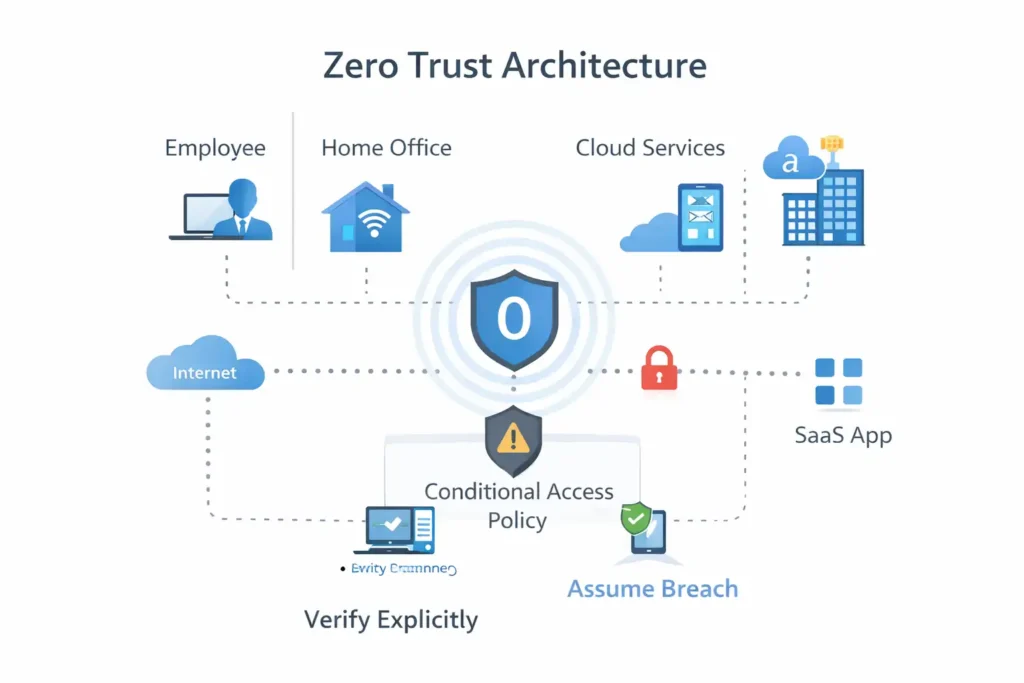
The natural next step after this level is advanced identity topics such as Privileged Identity Management, Zero Trust architecture design, and enterprise-scale identity governance.