Part 3 of the SC-300 Microsoft Identity and Access Administrator series
Every time you click Sign in with Microsoft, a lot happens in a few seconds: someone checks who you are, someone decides what you may open, and a small digital proof moves between systems. Before you configure Conditional Access, app registrations or single sign-on, you need the vocabulary behind that.
In this post you will learn the difference between authentication and authorization, what Zero Trust means in one minute, the three kinds of tokens, and what OAuth 2.0, OpenID Connect, SAML and Kerberos each do. At the end you will decode a real token in your lab. No coding is needed.
Also Read:
- SC-300 Exam Guide: Skills Measured, Study Plan and Free Resources
- Build Your Free SC-300 Lab: Microsoft Entra Tenant, P2 Trial and Azure (Step by Step)
Identity Basics for SC-300
Quick Summary
- Authentication answers who you are. Authorization answers what you are allowed to do
- Microsoft’s identity platform uses OpenID Connect (OIDC) for authentication and OAuth 2.0 for authorization
- SAML also handles authentication and single sign-on, mostly for enterprise web apps
- Kerberos is the ticket-based protocol used by on-premises Active Directory
- Three tokens do the work: the ID token (who signed in), the access token (what the app may call) and the refresh token (gets new tokens)
- Tokens are bearer tokens, so treat them like passwords
- Zero Trust rests on three ideas: verify explicitly, use least privilege access, and assume breach
Authentication vs Authorization
Think of an airport. At the passport check, an officer confirms you are who you say you are. That is authentication. At the gate, your boarding pass decides whether you can board this particular flight. That is authorization. You need both, and authentication comes first.
| Authentication | Authorization | |
|---|---|---|
| The question | Who are you? | What are you allowed to do? |
| Examples in Microsoft Entra | Password, MFA, passkey, Authenticator | Entra roles, Azure RBAC, app permissions and consent |
| Protocols | OpenID Connect, SAML | OAuth 2.0 |
Microsoft’s documentation says the platform uses OpenID Connect for authentication and OAuth 2.0 for authorization. It also says the Azure cloud has other authorization systems, such as Microsoft Entra built-in roles, Azure RBAC and Exchange RBAC.
Zero Trust in One Minute
Zero Trust is the idea behind modern identity security. Microsoft describes it with three principles:
- Verify explicitly. Always authenticate and authorize using all the signals you have, such as user, device and location.
- Use least privilege access. Give people only the access they need, for only as long as they need it.
- Assume breach. Design as if an attacker is already inside, so you limit damage and watch for it.
You will use these ideas all through SC-300. Conditional Access is how you verify explicitly, roles and Privileged Identity Management are how you apply least privilege, and sign-in logs and risk detection help you assume breach.
Meet the Cast
OAuth 2.0 and OpenID Connect exchanges usually involve four parties:
| Party | Plain meaning | Example |
|---|---|---|
| Resource owner | The user | You |
| Client | The application that wants access | A mobile app or website |
| Authorization server | The identity provider that checks you and issues tokens | Microsoft Entra ID |
| Resource server | The API that holds the data | Microsoft Graph |
Tokens: The Proof You Carry
In the Microsoft identity platform, tokens are bearer tokens, usually formatted as JSON Web Tokens (JWTs). A bearer token gives access to whoever holds it, which is why you must protect it like a password.
| Token | What it does | Who uses it |
|---|---|---|
| ID token | Tells the app who signed in | The client application |
| Access token | Tells an API what the app is allowed to do | The API (resource server) |
| Refresh token | Lets the app get new access and ID tokens without asking you to sign in again | The client, talking to Entra ID |
The Four Protocols
| Protocol | What it does | Format | Where you will see it |
|---|---|---|---|
| SAML | Authentication and single sign-on | XML assertions | Enterprise apps with SAML SSO (Module 3) |
| OAuth 2.0 | Authorization, giving an app limited access on your behalf | Access tokens | App permissions and consent (Module 3) |
| OpenID Connect | Authentication, built on top of OAuth 2.0 | ID tokens | Modern apps, sign-in and SSO |
| Kerberos | Ticket-based sign-in inside a domain | Tickets | On-premises Active Directory and hybrid identity (Module 1) |
A few facts worth remembering, based on Microsoft’s documentation:
- OpenID Connect is built on OAuth 2.0, so the terms and flows look similar.
- OAuth is for authorization, and SAML is for authentication.
- OpenID Connect and SAML can both authenticate a user and enable single sign-on.
A simple way to remember OAuth: it is like a valet key. It lets an app do specific things on your behalf without handing over your full password.
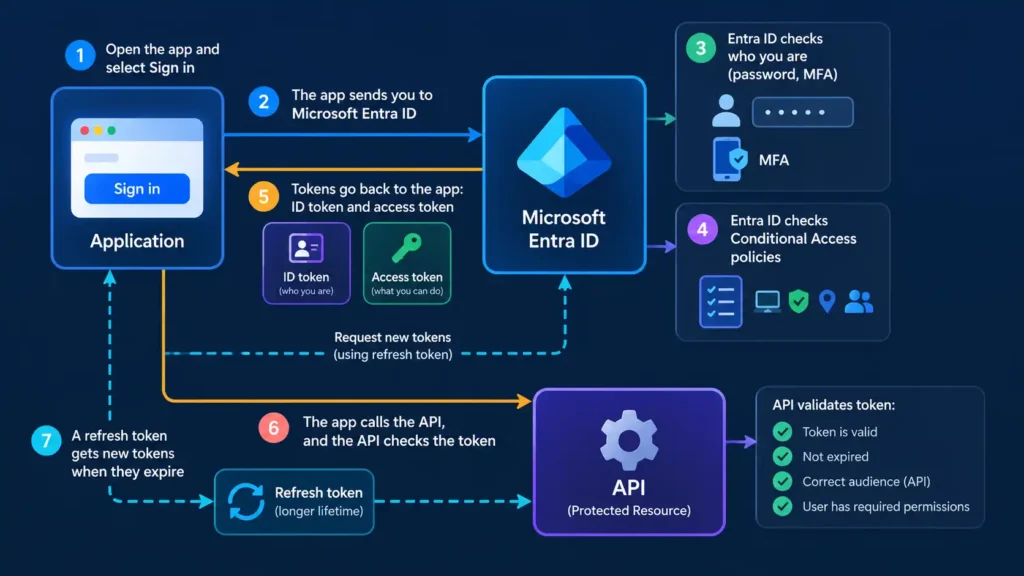
A Sign-in in Plain Words
- You open an app and select Sign in.
- The app sends you to Microsoft Entra ID, which is the identity provider.
- Entra ID checks who you are, for example with a password and MFA.
- Entra ID checks any Conditional Access policies that apply.
- Entra ID sends tokens back to the app: an ID token to say who you are, and an access token for what the app may do.
- The app calls the API with the access token, and the API checks the token before it answers.
- When the access token expires, the refresh token gets a new one.
Demo: Decode a Token in Your Lab
This demo uses your lab from Episode 0.2. Use a lab user only, and never paste a token from a work or production account into any website.
- Open Graph Explorer in a private window.
- Sign in with a lab user, for example labadmin. If it asks you to consent to permissions, read them first. In a lab, basic permissions such as User.Read are fine.
- Find the Access token tab (the label can vary) and copy the token.
- Open jwt.ms and paste the token.
- Look at the claims.
What to look for:
| Claim | What it tells you |
|---|---|
| aud | The audience: who the token is for. For Graph Explorer it is Microsoft Graph |
| iss | The issuer: who created the token (Microsoft Entra ID) |
| tid | Your tenant ID. You will see it again in logs and app registrations |
| scp | The scopes, which are the delegated permissions the app has been given, such as User.Read |
| exp | When the token expires |
This token is authorization in action: the access token shows what the app may do (scp), for which API (aud), in which tenant (tid). Delete nothing, and close the tab when you finish. Tokens expire, but treat them as secrets anyway.
Where This Shows Up in SC-300
| Concept | Where you will meet it |
|---|---|
| Authentication | Authentication methods, MFA and passkeys (Module 2) |
| Authorization | Entra roles, Azure RBAC and PIM (Modules 1 and 4) |
| OAuth 2.0 and consent | App permissions and admin consent (Module 3) |
| SAML and OpenID Connect | Single sign-on for enterprise applications (Module 3) |
| Kerberos | Hybrid identity and on-premises sign-in (Module 1) |
| Tokens | Conditional Access session controls and continuous access evaluation (Module 2) |
Exam Tips
- Know which protocol does what: SAML and OpenID Connect authenticate, and OAuth 2.0 authorizes.
- Know the three token types and who each one is for.
- Remember that OpenID Connect is built on OAuth 2.0.
- Read scenario questions slowly. A sentence about an app that needs limited access to Microsoft Graph on a user’s behalf points to OAuth permissions and consent.
- Do not confuse Entra roles (what an admin can do in the directory) with app permissions (what an app can do with an API).
Test Yourself
- Which question does authentication answer? Who are you? (Authorization answers what you are allowed to do.)
- Which protocol does the Microsoft identity platform use for authentication, and which for authorization? OpenID Connect for authentication, and OAuth 2.0 for authorization.
- What does SAML pass to an application to prove a user signed in? A SAML assertion, which is XML.
- Which token tells an app who signed in? The ID token.
- Which token lets an app get new tokens without asking the user to sign in again? The refresh token.
- Which claim in an access token says who the token is for? aud, the audience.
- Which protocol do on-premises Active Directory domains use for sign-in tickets? Kerberos.
- What are the three Zero Trust principles? Verify explicitly, use least privilege access, and assume breach.
Go Deeper: Related Videos on My Channel
I have covered some of these ideas before. Watch them for extra detail:
- SSO, SAML, OAuth and OIDC explained with Entra ID demos
- Authentication, Authorization and Accounting (AAA) explained
- What is Microsoft Entra ID?
- IAM and Microsoft Entra ID basics
- Short: Authentication vs authorization
- Short: SAML in 60 seconds
Free Resources and Links
| Resource | Use it for |
|---|---|
| OAuth 2.0 and OpenID Connect on the Microsoft identity platform | The official overview of the protocols and the four parties |
| Authentication vs authorization | Microsoft’s comparison of OAuth, OpenID Connect and SAML |
| Zero Trust overview | The three principles in depth |
| Graph Explorer | Get a token for the demo |
| jwt.ms | Decode the token |
| Official SC-300 study guide | The skills measured list |
| Free practice assessment | Check your progress |
What Is Next
Now you speak the language. In the next post we cover Microsoft Entra ID licensing: Free, P1, P2, Governance and the Suite, and which features need which license.
Which of these terms confused you the most? Leave a comment and I will answer it in a future video.