If you manage Exchange Online in Microsoft 365, you’ve probably heard these two terms again and again—sometimes in audits, sometimes in incident calls, and sometimes when someone from compliance drops a “quick question” in your inbox:
- Litigation Hold
- Retention Policies (Microsoft Purview)
On paper, both sound like they do the same job.
They both claim to “retain” data.
They both help you “protect email.”
And they both show up when people talk about compliance, investigations, and eDiscovery.
So, it’s completely normal for admins to assume:
“If I already have a retention policy, then Litigation Hold is just another name for the same thing.”
But they’re not the same—and treating them like they can lead to serious problems.
[wpcode id=”1669″]
Because the moment you face a real-world situation like:
- an employee deleting emails during an incident
- a VIP mailbox needing preservation
- a legal case requiring evidence export
- an executive leaving the company and their mailbox needing retention
…you’ll realize these two features behave very differently, and they are designed for different purposes.
This post will break it down in a simple and practical way:
✅ what Litigation Hold really does behind the scenes
✅ what Purview retention policies actually control
✅ when you should use one vs the other
✅ what to do during incidents (when time matters)
✅ what precautions to take during employee offboarding so data isn’t lost or mishandled
Explore more articles in Microsoft 365 Section.
[wpcode id=”1674″]
Litigation Hold vs Purview Retention in Microsoft 365 (Exchange Online)
What is Litigation Hold?
Litigation Hold is an Exchange Online feature that protects mailbox data from being permanently deleted.
Its main purpose is to ensure that mailbox content stays preserved for legal, compliance, HR, or security investigations—even if the user tries to remove evidence.
In simple terms, Litigation Hold means:
“This mailbox is frozen for preservation. Deletion by the user will not permanently destroy anything.”
Why is it needed?
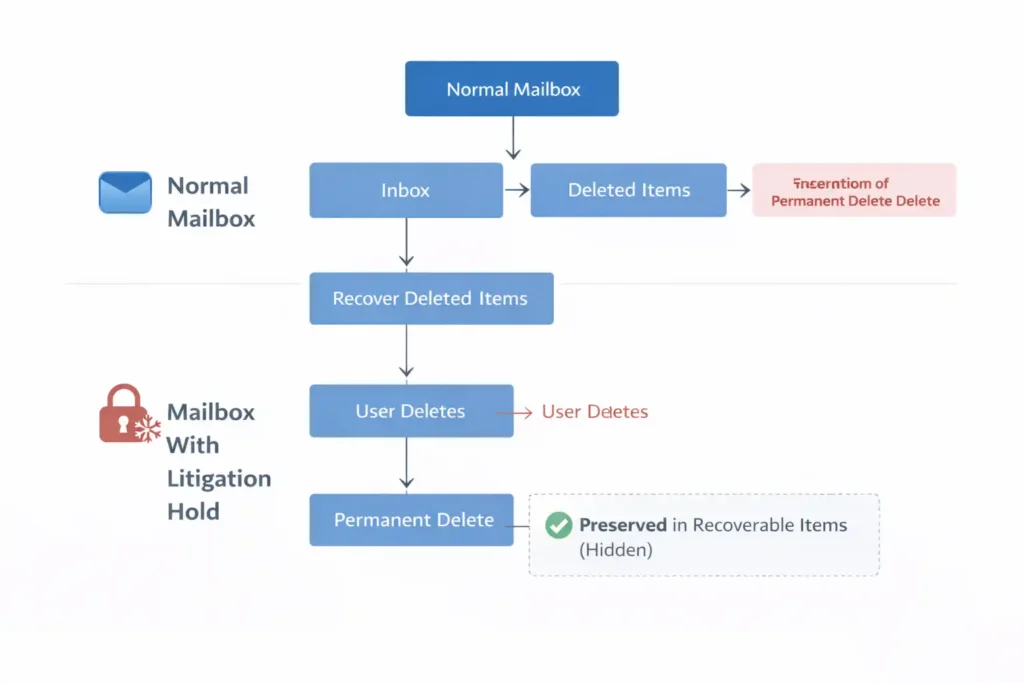
In normal mailbox behavior, users can delete emails and eventually remove them completely by:
- deleting from Inbox
- emptying Deleted Items
- using Shift + Delete (permanent delete)
If this happens during an investigation, the organization can lose critical evidence or business records.
Litigation Hold exists to prevent exactly that.
What happens when Litigation Hold is enabled?
Once Litigation Hold is enabled on a mailbox, Exchange changes how deletion works:
Even if the user:
- Deletes an email from Inbox
- Empties Deleted Items
- Shift + Deletes an email permanently
✅ Exchange still preserves a copy of that item.
The user may think it’s gone, but Exchange stores it in a hidden system location.
Where does Exchange store preserved items?
When Litigation Hold is enabled, deleted or modified items are stored in a hidden mailbox area called:
Recoverable Items
This area is not visible in the normal Outlook folder list.
It is designed for preservation and eDiscovery, and it holds content such as:
- deleted items the user removed
- items emptied from Deleted Items
- “purged” items (attempted permanent delete)
- older versions of items after edits (in many cases)
This is why compliance teams can still retrieve mail that users claim they deleted.
What kind of data is preserved?
Litigation Hold preserves most Exchange mailbox content, including:
✅ Emails
✅ Calendar items (meetings, invites)
✅ Contacts
✅ Tasks
✅ Notes
So it’s not just “mail”—it’s the full mailbox record.
When do organizations use Litigation Hold?
Litigation Hold is most commonly used when:
- Legal case / court notice requires preservation
- HR investigation is running
- Security incident happens (suspected insider threat)
- A VIP mailbox (CEO, CFO, Legal Head) needs stronger preservation
It’s especially valuable in cases where there is a risk someone might delete, edit, or hide content.
Key takeaway
✅ Litigation Hold = mailbox preservation for legal/investigation scenarios
It doesn’t just keep emails from being deleted from the Inbox—it ensures that even permanent deletion attempts are still retained inside the mailbox’s hidden preservation storage.
[wpcode id=”1677″]
What is Microsoft Purview Retention?
Microsoft Purview retention is Microsoft 365’s compliance and governance framework that helps organizations control how long data should be kept (and when it should be deleted) across Microsoft 365 workloads.
Instead of protecting just one mailbox or one user, Purview retention is designed to work at scale—across the organization—so your company can meet compliance, audit, and regulatory requirements.
In simple terms:
Purview retention defines your company’s official rules for data lifecycle.
What can you do with Purview retention?
With Purview retention, you can create policies that define what should happen to data over time, such as:
✅ Retain data for a fixed period
For example:
- Retain Exchange email for 7 years
- Retain OneDrive files for 5 years
- Retain SharePoint content for 10 years
- Retain Teams messages for X years (depending on policy type and configuration)
This ensures that even if users delete content, the organization still meets compliance requirements.
✅ Delete data after a defined period
Purview retention can also enforce cleanup policies, such as:
- Delete emails after 2 years
- Delete OneDrive content after 3 years
- Delete Teams chats after 1 year
This helps with:
- reducing unnecessary data storage
- lowering legal risk from over-retention
- keeping environments cleaner and better governed
Why organizations use Purview retention
Purview retention is often required for:
- regulatory compliance (finance, healthcare, legal, government, etc.)
- internal audit requirements
- corporate governance standards
- records management and long-term data control
It provides a central and consistent way to apply retention across the tenant, rather than manually managing retention mailbox-by-mailbox.
Purview retention is “modern retention” in Microsoft 365
The biggest reason Purview retention is considered the modern approach is because it supports multiple platforms, not just email.
So instead of only saying “keep Exchange mail”, you can enforce retention across the full Microsoft 365 data ecosystem, including:
✅ Exchange
✅ SharePoint
✅ OneDrive
✅ Teams (depending on setup)
Key takeaway
✅ Purview retention = organization-wide retention rules
✅ It is the preferred solution for long-term compliance and governance in Microsoft 365
If Litigation Hold is like freezing a specific mailbox for an investigation, then Purview retention is like setting the official company policy for what data must exist—and for how long—across the entire environment.
[wpcode id=”1678″]
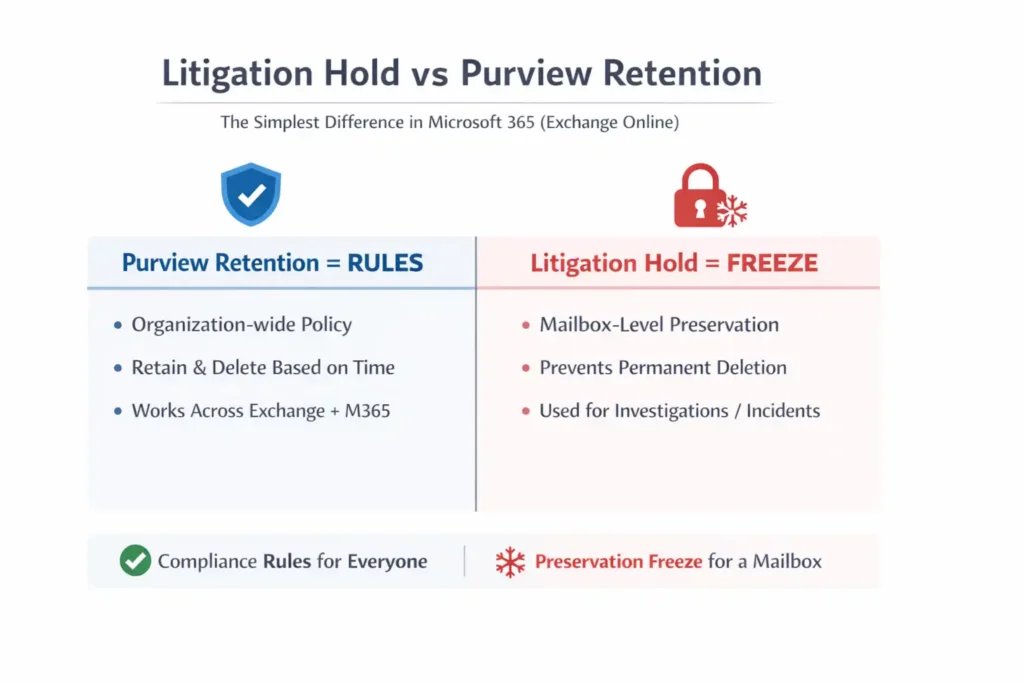
Litigation Hold vs Purview Retention – The Simplest Difference (Easy to remember)
If you want one simple way to remember the difference forever, it’s this:
✅ Purview Retention = Rules
Purview retention is your organization’s official compliance policy for how long data should exist.
It answers questions like:
- How long should we keep Exchange emails?
- How long should we retain SharePoint documents?
- Should content be deleted after a period to reduce risk?
Purview retention is designed to enforce consistent and scalable governance, meaning it’s ideal for applying rules across:
✅ all users
✅ departments
✅ the entire tenant
In short:
Purview retention defines “what the company must retain” and “for how long.”
✅ Litigation Hold = Freeze
Litigation Hold is used when you need to preserve everything in a specific mailbox, usually because something urgent happened and you need to prevent loss of evidence.
It’s typically enabled when there is:
- a legal dispute
- a compliance investigation
- an HR case
- a security incident
- an executive mailbox preservation requirement
Once it’s enabled, Exchange preserves deleted and modified mailbox content in a hidden storage area, even if the user tries to permanently delete it.
In short:
Litigation Hold freezes a mailbox so nothing can be permanently destroyed.
A real-world example (fast mental picture)
Situation:
A user is under investigation, and you suspect they may delete emails.
✅ If you rely only on rules (Purview retention), you’re depending on policy coverage and configuration.
✅ If you apply freeze (Litigation Hold), you immediately ensure the mailbox cannot permanently lose content.
One-line takeaway
✅ Purview Retention = company-wide compliance rules
✅ Litigation Hold = emergency preservation freeze for a mailbox
That single distinction—Rules vs Freeze—is enough to pick the right tool in most real scenarios.
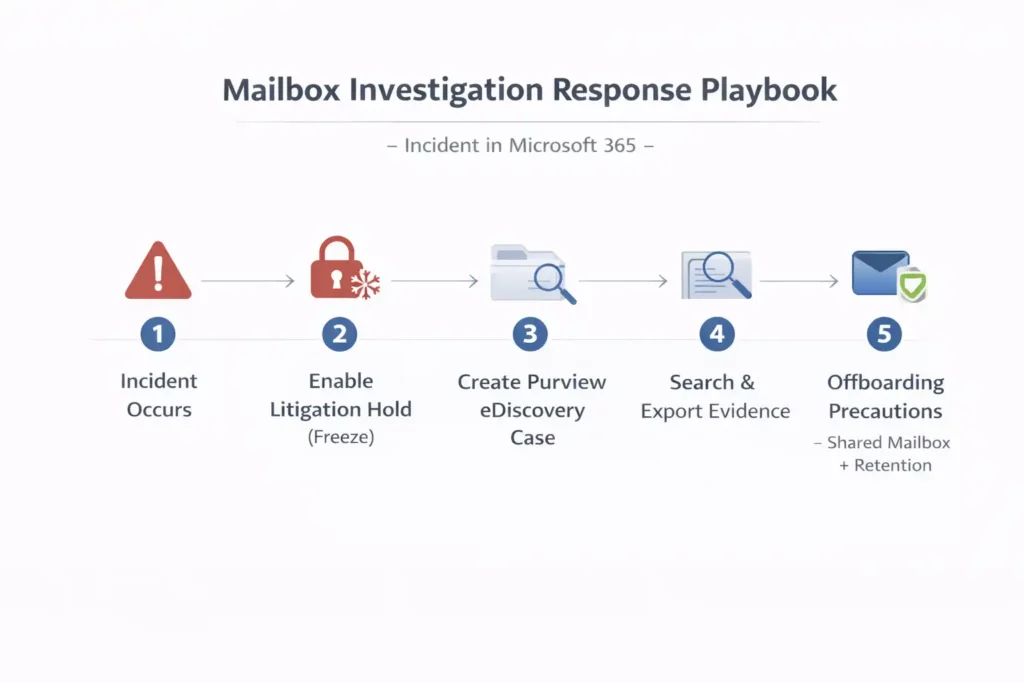
“If Purview is enabled, do we still need Litigation Hold?”
Often yes — because Litigation Hold is a fast, mailbox-level emergency action.
Example
If there is an incident today and you suspect evidence may be deleted:
✅ Enable Litigation Hold immediately
✅ Run Purview eDiscovery search/export
✅ Preserve evidence safely
Purview retention works best when it was already applied, but Litigation Hold is the quick switch during incidents.
[wpcode id=”1757″]
Does “Retention for 7 years” mean I can always recover 7 years of email?
✅ Yes — if retention was already active and applied to that mailbox.
But retention is not “time travel.”
If an email was:
- permanently deleted,
- already purged,
- and retention/hold was not active earlier,
then it may not be recoverable.
✅ Purview preserves what was being retained
❌ It cannot restore data that was never protected
What should you do after enabling Litigation Hold?
A very common question is:
“I enabled Litigation Hold. Now how do I recover the deleted emails?”
Litigation Hold preserves items, but it does not automatically restore them to Inbox.
After enabling Litigation Hold, you have 3 practical options:
✅ Option 1: Use Microsoft Purview eDiscovery (Best for investigations)
- Search emails (including deleted content)
- Export results (PST or review set)
- Provide evidence to legal/security
This is the clean and professional investigation method.
✅ Option 2: Restore deleted items back into mailbox (Admin recovery)
If your goal is to bring emails back for the user, Exchange recovery can help (depending on recoverability).
✅ Option 3: Delegate mailbox access (Business continuity)
You can grant Full Access to a manager or legal team to browse the mailbox normally.
⚠️ Important: Delegation does not guarantee visibility into all “deleted evidence.”
For that, eDiscovery is the correct method.
Is it good practice to enable Litigation Hold for all mailboxes?
In most organizations: ❌ No.
Because it:
- increases mailbox size significantly over time
- retains deleted/modified content for everyone
- increases legal exposure (more data to produce in eDiscovery)
- becomes expensive and difficult to manage
✅ Best practice is:
- Purview retention for all users
- Litigation Hold only for VIPs or investigations
Should CEOs and VIP mailboxes be on Litigation Hold?
✅ It’s common practice to apply extra protection for:
- CEO / Directors
- Legal department
- Finance approvers
- HR leadership
But the best approach in 2026 is usually:
✅ Purview retention for everyone
✅ VIP users get additional legal hold controls when needed
[wpcode id=”1759″]
What happens if the mailbox is on Litigation Hold and the user leaves the company?
This is a critical point.
Litigation Hold preserves data as long as the mailbox exists.
So if you delete the user account and later the mailbox is permanently removed, the hold cannot protect anything because the mailbox is gone.
✅ Best offboarding precautions for VIP mailboxes:
- Convert mailbox to Shared Mailbox
- Ensure Purview retention policy applies
- Enable archive mailbox if required
- Use eDiscovery export if it’s a legal/security case
- Block sign-in + revoke sessions

Final Summary
Final Summary
✅ Purview retention = long-term, organization-wide compliance rules (retain/delete data based on policy)
✅ Litigation Hold = incident/legal “freeze” for a specific mailbox (prevents permanent deletion)
✅ Best strategy = Use Purview as the baseline for everyone + enable Litigation Hold only when needed (VIPs, legal cases, HR/security investigations)
[wpcode id=”1760″]
FAQ: Litigation Hold vs Purview Retention (Microsoft 365 / Exchange Online)
1) What is the main difference between Litigation Hold and Purview Retention?
Purview retention is your organization-wide compliance policy that controls how long data should be retained (and optionally deleted) across Microsoft 365.
Litigation Hold is a mailbox-level preservation feature in Exchange Online used mainly for legal, HR, or security investigations to prevent permanent deletion.
A simple way to remember:
✅ Purview Retention = Rules
✅ Litigation Hold = Freeze
2) If I have Purview retention enabled, do I still need Litigation Hold Microsoft 365?
Sometimes, yes.
Purview retention is best for long-term compliance, but Litigation Hold is still useful when you need a quick and targeted action during an incident, such as:
suspected evidence deletion
HR investigation
legal request
VIP mailbox preservation
In incident response, Litigation Hold is often the fastest “freeze mailbox now” option.
3) Does Litigation Hold retain everything forever?
Not necessarily.
Litigation Hold can be configured as:
Unlimited hold (keeps items until hold is removed)
Duration-based hold (keeps items for a defined number of days)
Many organizations prefer setting a duration aligned with compliance needs to avoid indefinite retention.
4) Does Purview retention guarantee I can recover 7 years of email?
✅ Usually yes—if the retention policy was active and applied to that mailbox during that period.
Purview retention means data is retained for 7 years from the time it was created/received (depending on policy configuration).
However, retention is not a time machine.
If an item was permanently deleted and purged before retention applied, recovery may not be possible.
5) If a mailbox is on Litigation Hold, does the user get a notification?
No. ✅
Users do not get alerts, pop-ups, or notifications when Litigation Hold is enabled.
Deleting mail looks normal to the user, but Exchange silently preserves deleted/modified items in the background.
6) When should I use Litigation Hold instead of Purview retention?
Use Litigation Hold when you need immediate mailbox preservation, such as:
legal investigation
HR complaint
suspected insider threat
audit or incident response for a specific user
Use Purview retention for long-term compliance, like keeping Exchange data for 7 years across the organization.
7) Is it a good idea to enable Litigation Hold for all mailboxes?
Generally, no. ❌
Enabling Litigation Hold for all users can cause:
rapid mailbox growth (because deleted/modified items are preserved)
higher storage consumption
larger eDiscovery exports
increased legal exposure (more historical data retained)
Best practice is:
✅ Purview retention for everyone
✅ Litigation Hold only for VIPs and investigations
8) Should CEO/CFO/VIP mailboxes always be on Litigation Hold?
Many organizations apply stronger preservation for executives and sensitive roles, such as:
CEO, CFO
Legal leadership
HR leadership
Finance approvers
However, modern best practice is:
✅ Use Purview retention as the baseline
✅ Use Litigation Hold when required by policy, legal guidance, or incident needs
Some organizations keep VIPs on hold permanently, but it should be reviewed and documented.
9) What happens if a user leaves the company and their mailbox is on Litigation Hold?
Litigation Hold preserves mailbox content while the mailbox exists.
If the user is deleted and the mailbox later gets permanently removed, the hold cannot protect anything because the mailbox no longer exists.
✅ Best practice for offboarding VIPs:
Convert mailbox to a Shared Mailbox
Ensure Purview retention applies
Preserve access properly (legal/manager)
Export evidence via eDiscovery if required
10) Can I delete a user account if the mailbox must be preserved?
You can delete the user account, but you must ensure the mailbox is preserved properly.
Common safe approach:
✅ Convert mailbox to Shared
✅ Apply retention policy
✅ Restrict access
✅ Export evidence if needed
Deleting without a preservation plan can risk mailbox lifecycle cleanup later.
11) After enabling Litigation Hold, how do I recover deleted emails?
Litigation Hold does not automatically restore items to the Inbox.
To recover items, you typically do one of the following:
✅ Use Purview eDiscovery to search and export deleted content (best for investigations)
✅ Use mailbox recovery methods (when possible) to restore items back to mailbox folders
✅ Grant access to a delegate for business continuity (not ideal for deleted evidence)
For investigations, eDiscovery is the preferred recovery method.
12) Does giving Full Access to a mailbox allow someone to see deleted items preserved by Litigation Hold?
Not always. ⚠️
Full Access allows someone to browse the normal mailbox folders, but it does not guarantee visibility into all preserved items stored in hidden retention locations.
For preserved deleted content, use:
✅ Purview eDiscovery (recommended)
13) Can Purview help during an incident if the incident happened before I enabled Litigation Hold?
Yes—if Purview retention was already active and applied before the deletion happened.
If there was no retention or hold, and data was permanently purged, then:
❌ Purview cannot restore what was never preserved.
14) Can Litigation Hold and Purview retention work together?
Yes. ✅
In fact, many organizations use both:
Purview retention for tenant-wide compliance
Litigation Hold for mailbox-level investigation preservation
This gives you both governance and incident readiness.
15) What is the best overall strategy for Microsoft 365 mailbox retention?
✅ Purview retention as the baseline for all users
✅ Litigation Hold only for VIPs and legal/security/HR investigations
✅ eDiscovery for searching and exporting evidence
✅ Archiving/MRM policies for mailbox size management (separate from compliance retention)
[wpcode id=”1680″]